
How to reconnect to Captive Portal without reboot
To get back to Captive Portal you don't have to reboot device.
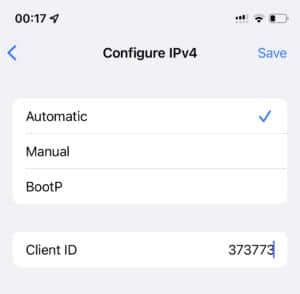
- Go to the Wi-Fi settings
- Find the IP4 section
- Enter to the Client ID field any random numbers
- Press Back and wait on the Wi-Fi list screen
YouTube or video playback are not working/crashing fix
We don't know the reason of crashes, but for sure we found the way to fix it. Many users reported that this solution worked.
To fix that you need to restore device firmware using iTunes. Follow those instructions.
How To Restore Firmware Via iTunes in DFU Mode?
How can I add a navigation backward/forward button?
For now there is possibility to use backward/forward buttons in Captive Portal only. As soon as we find the way to add it in other methods, an update will be released immediately.